



Run braided workforce funding like ops.
One participant journey. Multiple programs, partners, and funding streams. Defensible data, documentation, and reporting.
Turbine ComplianceOps is the operating layer for workforce compliance, participant data quality, braided funding coordination, and reporting readiness. Collect participant and service data once, validate against program rules, assign payer responsibility, maintain evidence, and prepare clean files or documentation packages for state systems, WIPS, monitoring, and performance reporting.
Compliance ops leads
Braided funding operations
Normalize once, export everywhere
Braiding is the right approach—but it's operationally brutal
Federal policy encourages braiding funding streams to serve more learners across the full journey. In practice, the coordination overhead is enormous.
Multiple funding streams, each with its own tracking and compliance rules
Separate reporting into disconnected state systems and formats
Coordinated service delivery across partners—without a shared operating layer
One operating layer that keeps every payer, program, and partner aligned—without rebuilding compliance logic from scratch each quarter.
A compliance operations layer for WIOA-aligned and ETA-funded workforce programs
Turbine turns program rules into configurable workflows, flags exceptions before they reach a deadline, and routes remediation to the responsible owner—so your team focuses on delivery, not spreadsheet archaeology.
Controls
Configure allowability, documentation requirements, and timing rules—validated at the workflow level and flagged when exceptions occur
Workflows
Ownership, approvals, deadlines, and escalation paths built into every service event
Audit trail
Who did what, when, and why—fully traceable from participant record to exported file
Exports
Export clean, state-specific files or prepare import-ready packages for CWDS, CalJOBS, OSOS, WIPS, and other systems of record
Run the whole pipeline—not just the report.
Most systems start at enrollment. Real programs start earlier (referrals, outreach) and succeed later (retention, advancement). Turbine ComplianceOps tracks the full journey end-to-end—so braided programs stay coordinated, compliant, and outcome-driven.
Connection
Capture every referral before participation is triggered
- Targeted outreach and partner referrals
- Warm handoffs across agencies and co-located programs
- Reportable individual status before formal enrollment
Entry
Standardize eligibility, intake, and enrollment without slowing it down
- Eligibility determination and priority-of-service indicators
- Required documentation checklists and consent status
- Program enrollment and co-enrollment tracking
Progress
Make services, training, and milestones measurable and defensible
- Service plans, OJT/RTI tracking, and MSG evidence
- Training enrollment, completion, and credential status
- Wraparound supports with payer-of-record clarity
Exit
Manage exits cleanly across co-enrolled programs
- Last service date and planned future service review
- Common exit logic for co-enrolled participants
- Exit review queue and certifier assignment
Follow-Up
Track outcomes through required follow-up periods
- Employment and retention verification
- Median earnings and credential attainment tracking
- Follow-up contact schedule and documentation
Reporting
Prepare clean files, reports, and monitoring packets
- QPR, QNR, PIRL, and ETA-9169 readiness
- State-system export files or import-ready packages
- Monitoring packet and validation evidence generation
Normalize once.
Validate continuously.
Export with evidence.
Every state has a different system. Your compliance logic shouldn't change. Turbine maintains a canonical participant and services record—and produces state-specific outputs, or packages documentation for systems where direct connectors are not available.
Turbine stores your program in a canonical WIOA + braided funding model—PIRL-aligned, program-year aware, and evidence-linked—then generates state-specific outputs on demand.
One source of truth. Many destinations.
Pull data from local/state systems, spreadsheets, forms, and partner feeds
Map to canonical fields and code sets—race/ethnicity, barriers, services, credentials, dates
Run rule checks: required fields, valid values, timing logic, duplicates
Derive items needed for reporting—outcome flags, exit logic, participation timelines
Produce state-specific output formats, audit packs, and PIRL-ready participant files
See every program, payer, and partner in one place
The ComplianceOps Control Room surfaces what's due, what's missing, and what's at risk—with exception-based queues routed to the right owner.
Braiding is not just a finance model. It is a continuity model.
No single funding source covers the full journey. Different payers cover different stages—which means gaps in coverage become gaps in compliance, evidence, and outcomes.
Outreach or partner funding
WIOA / AEL / RTW intake resources
Training funds, employer contributions, grants
Supportive service or retention funding
Partner or grant-funded services
Career services, employer engagement, apprenticeship supports
No single funding source covers the full journey—braiding ensures continuity.
The specific gap or service required at this stage
Which funding stream is responsible for this service
Allowability, documentation requirements, timing
Source documentation, timestamps, verification
Performance measure alignment and expected result
participant need → service event → payer → rule → evidence → outcome
Full Journey Coverage Gap
Participants have service or evidence gaps across recruitment, eligibility, tuition, coaching, wraparound support, or placement/retention.
Review this participant's full journey from recruitment through retention. For each stage, identify the service event, payer of record, applicable rule, required evidence, outcome marker, and any gaps that could affect compliance reporting or continuity of service.
Five steps inside the product
Turbine walks your team through the braid in a structured workflow—from funding inventory to crosswalk documentation—without a single spreadsheet.
Fewer gaps for participants, fewer headaches for compliance.
Crosswalk documentation, payer sequencing, and evidence packs generated automatically.
Inventory funding sources
Map every active funding stream—WIOA Title I, II, and III, Perkins, state grants, employer contributions—into one operating model.
Define allowable uses
Configure payer-specific rules for each service type. Turbine enforces them at the point of service delivery.
Map funds to participant needs
Run a gap analysis against each participant's service plan. Identify which payer covers which segment of the journey.
Assign primary vs. supplemental payer
Establish payer sequencing for every service event. Prevent duplication and document supplementation logic.
Generate crosswalk documentation automatically
Turbine produces the payer crosswalk, evidence attachments, and audit-ready export package—no spreadsheet archaeology required.
Your program isn't one pot of money. It's a braid.
AEL + RTW + WIOA Title I + employer contributions + state grants. Turbine lets you assign payer logic to every service event and keeps the braid documented, allowable, and exportable.
Primary vs. supplemental payer
Assign the lead payer for each service event and document supplementation logic—preventing duplication and protecting allowability.
Allowability + caps + documentation by source
Configure funding-source-specific rules. Turbine enforces them automatically at the point of service delivery.
Crosswalk documentation, auto-generated
Partners stay aligned without manual coordination. Turbine produces the crosswalk, evidence packs, and payer sequencing documentation.
Normalize once.
Inject everywhere.
Every state has a different system of record. Turbine maintains a canonical participant and services record and produces configurable exports, import-ready files, or documentation packages—whatever the destination requires.
Whatever format the state solution expects
PIRL-aligned participant files when required
The "why this value is true" documentation bundle
Turbine supports direct connectors where available and configurable export and import-file preparation for any other system of record. "Support" means field mapping, file preparation, and validation—not necessarily direct API injection.
What you can do with Turbine
ComplianceOps Control Room
See what's due, what's missing, and what's at risk—across programs, partners, and payers. One dashboard for compliance operations at any scale.
Evidence-first reporting
Attach documentation once, reuse across every payer and report. Generate audit packets on demand—no manual assembly.
Data quality by design
Prevent common failure modes—missing fields, invalid codes, timing violations—before they reach your reporting deadline.
Partner accountability
Give subrecipients and partners clear tasks, required artifacts, and tracked SLAs. Escalate exceptions automatically.
Five views. One operating system.
ComplianceOps is structured around five operational dashboards—each surfacing a distinct layer of compliance risk and readiness, all connected to the same underlying participant and program record.
Control Room
Your daily compliance operating view
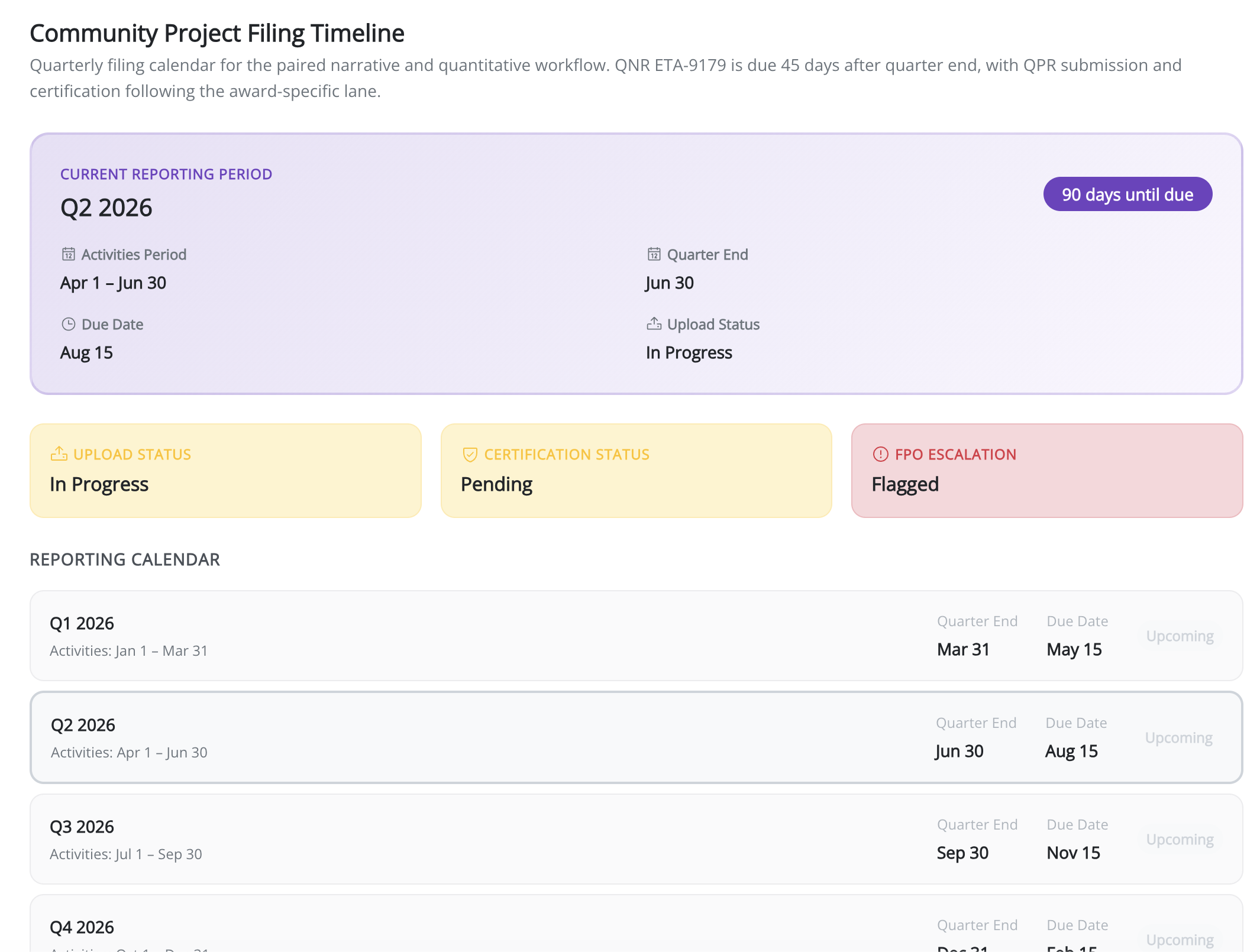
Current quarter, days to deadline, QPR/QNR readiness by lane
Missing required fields, invalid codes, timing violations across active participants
Reportable individuals, new participants, exiters pending review, follow-up windows open
Services without a payer, missing allowability documentation, payer sequencing gaps
Employment 2nd quarter after exit, median earnings, credential attainment—by program and lane
Braid Builder
Funding coordination, step by step
Active streams mapped: WIOA Title I/II/III, Perkins, employer contributions, state grants
Service-type rules per payer, including caps, documentation requirements, and timing
Primary vs. supplemental payer per service event, duplication prevention
Auto-generated payer crosswalk, evidence attachments, and audit-ready documentation pack
Partner Accountability
Subrecipient and co-operator queues
Required artifacts, documentation SLAs, and overdue items per subrecipient
Exceptions auto-escalated to the responsible owner with deadline and severity context
Per-partner view of documentation completeness across active participants and service events
Reporting Readiness
QPR, QNR, and monitoring—lane by lane
Performance reporting readiness, PIRL elements, and outcomes by quarter
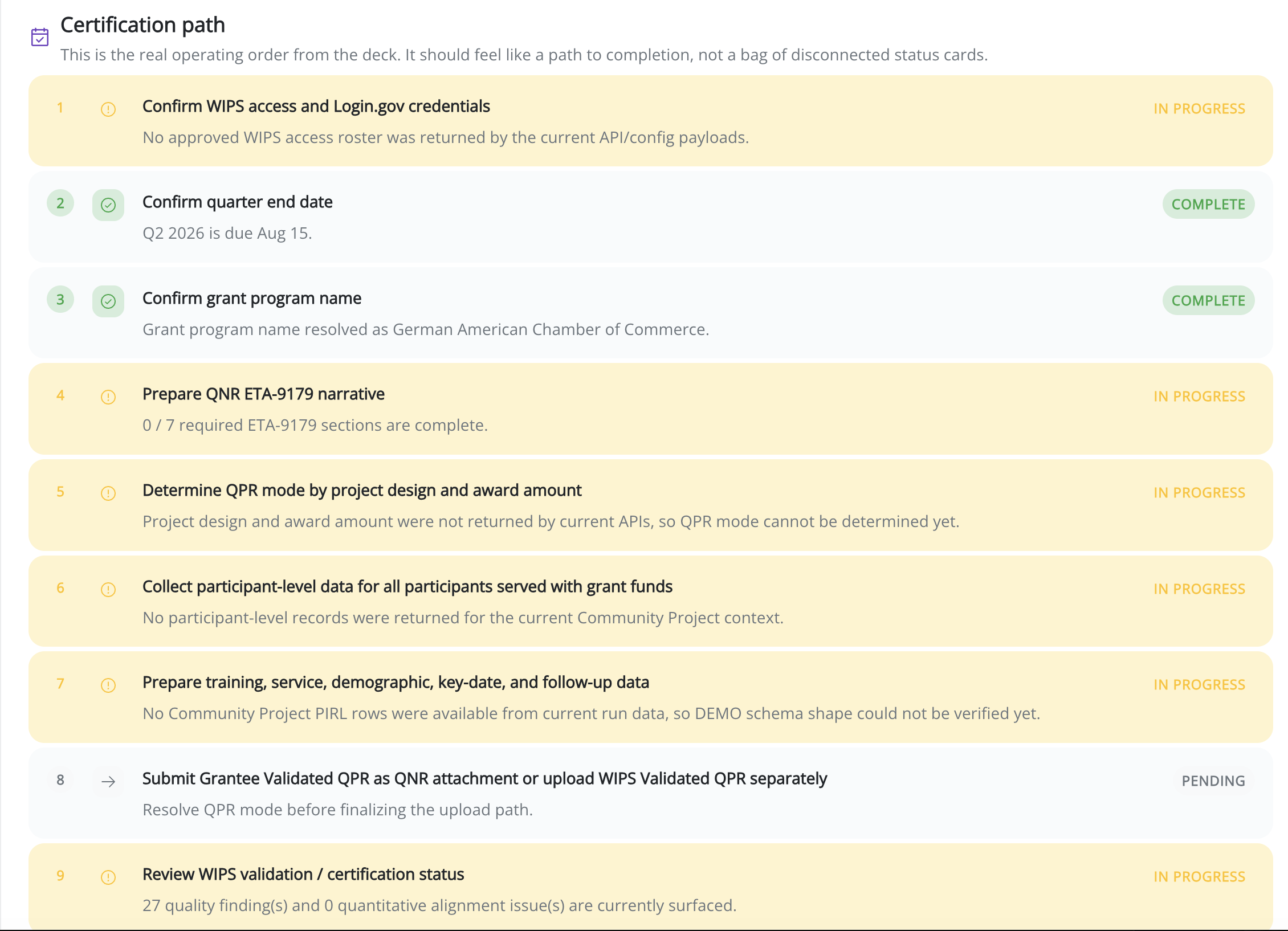
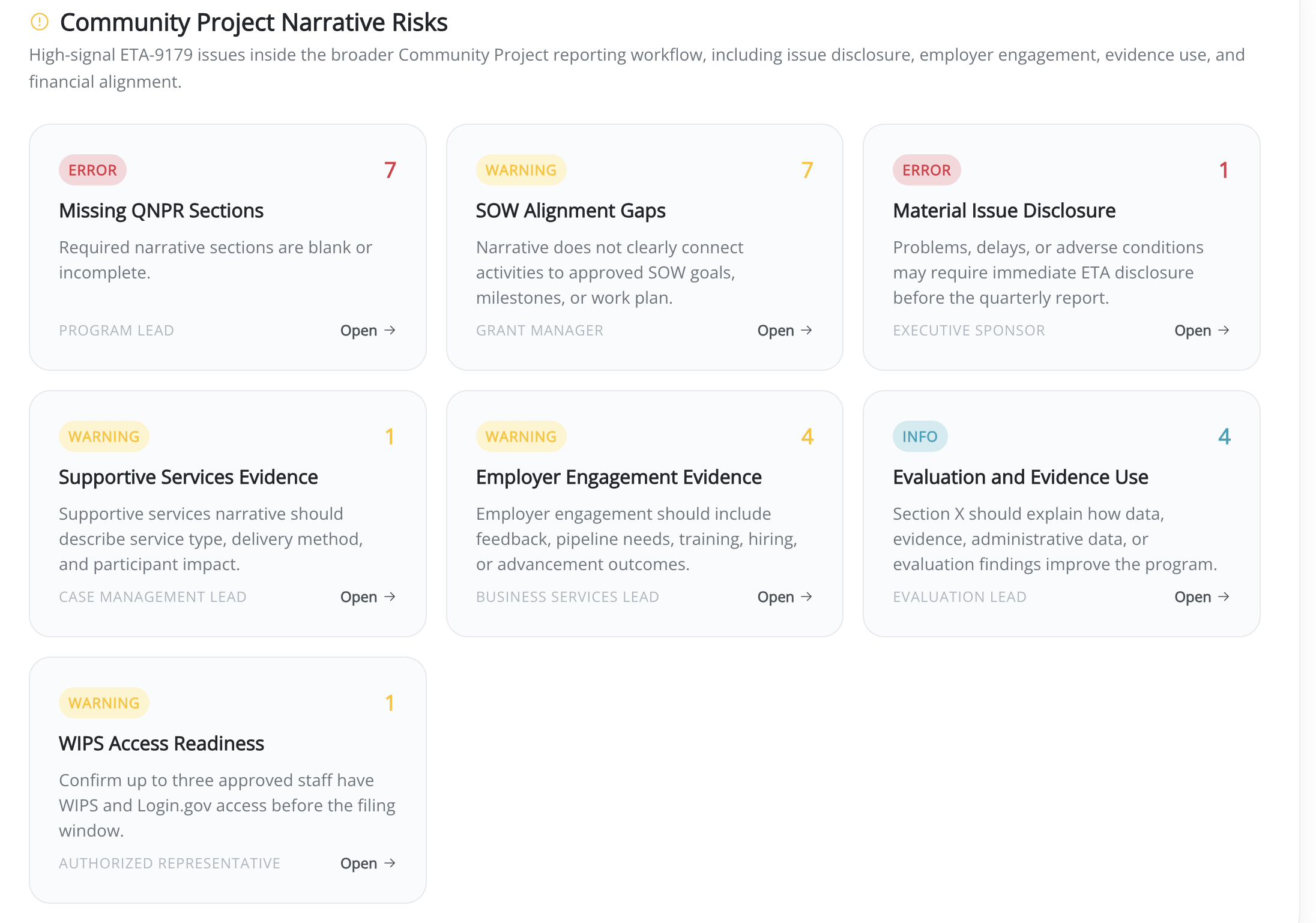
Narrative section status, data tables, certification readiness for ETA-9179 submissions
Monitoring packet completeness, validation evidence, and identified risk items with remediation status
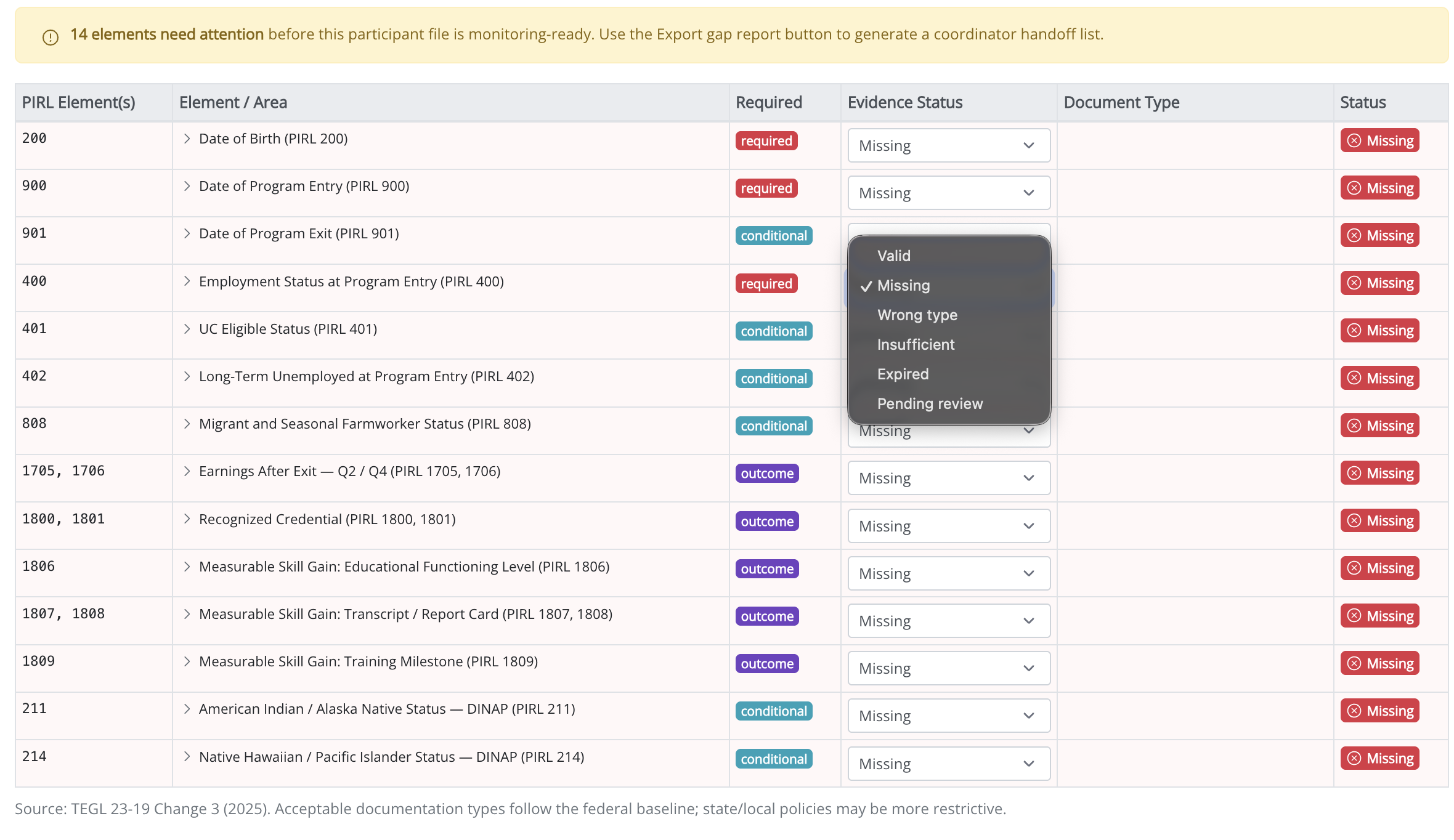
Catch missing fields before they reach your reporting deadline
Turbine checks every required PIRL data element at the point of entry—flagging missing evidence, wrong types, and conditional fields so your team can resolve them while the participant is still active.
Operational guidance,
grounded in your data.
The Compliance Agent is embedded in your workspace—not a generic chatbot. It already has your program context, active QPR lane, ETA-9179 readiness status, and certification signals.
The agent provides operational guidance based on your program configuration and participant data. It does not provide legal determinations or substitute for regulatory counsel.
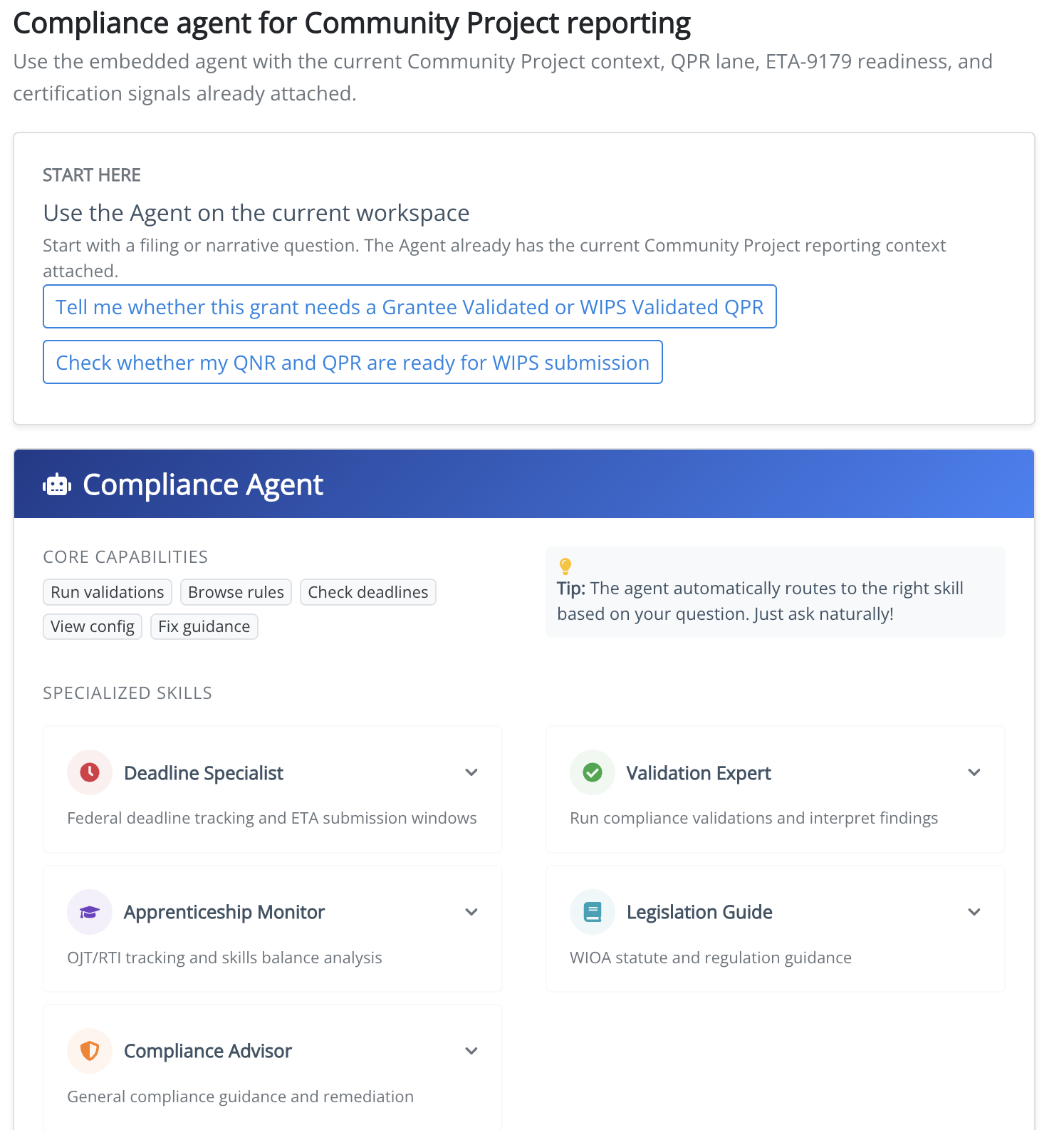
Federal deadline tracking, QPR/QNR windows, and ETA submission calendars
Run PIRL and program-rule validations and interpret specific findings
OJT/RTI balance tracking, related instruction compliance, skills milestones
WIOA statute, TEGL, and regulation guidance with rule citations
Operational remediation guidance for exceptions, gaps, and audit flags
Payer assignment review, allowability flags, and crosswalk documentation
What changes after Turbine
Teams that operate braided funding through Turbine spend less time on cleanup and more time on delivery.
Fewer late quarters and scramble cycles
Faster monitoring readiness
Cleaner files and fewer corrections
Stronger documentation integrity
Portable operations across states
Anyone who has to make WIOA + multiple payers work in the real world
The primary user is the person accountable for getting workforce reporting submitted correctly, on time, and with defensible evidence. ComplianceOps serves the full accountability chain.
State workforce agencies
Statewide PIRL quality, ETA-9169/QPR performance reporting, and deadline readiness across local areas.
Local workforce development boards
Participant records, missing services, exit/follow-up resolution, and local validation queues.
One-stop operators
Coordinated service delivery across co-located programs with clear documentation and ownership.
Training providers and intermediaries
OJT/RTI balance, competency progress, subrecipient reporting, and audit readiness for braided models.
Grant and community project leads
QNPR/ETA-9179 readiness, QNR/QPR filing packages, SOW alignment, and WIPS certification.
Participants, apprentices, or employers. They may provide data or evidence, but the ComplianceOps user is the accountable operator—the person who has to explain the status, fix the gaps, certify the submission, or escalate the risk.
Connection → Entry → Progress → Exit → Follow-Up → Reporting, with compliance built in.
Stop tracking each stage in a different spreadsheet. ComplianceOps gives you one operating view across every referral source, program lane, and funding stream—from first contact through outcome measurement.
Turn funding rules into workflows. Turn services into evidence.
Every payer has rules. Every service needs documentation. Every quarter ends with a report. ComplianceOps makes the whole system run—without rebuilding it from scratch each time.
Operate braided funding like a system.
Normalize once. Export everywhere. Stop rebuilding compliance from scratch every quarter.